


Menu QR Code Generator
Menu QR codes enable restaurants, cafes, hotels, and all businesses with price lists to display their food, beverages, services, and products with photos, details, ingredients, and prices.
Thanks to its dynamic structure, seasonal items, prices, and images can be easily changed unlimited times.
What is a Menu & Price List QR Code?
Digital Transformation with Menu & Price List QR Codes
Menu QR codes and price list QR codes are effective tools that enable businesses to present their service and product information digitally. Many businesses like restaurants, cafes, hair salons, spas, and tailors can easily deliver product prices, ingredients, and images to customers using this method.
QR codes placed in a visible location within the business direct customers to a digital price list when scanned with a smartphone camera or QR code reader app. This provides both a hygienic solution and instant access to information.
🌿 Eco-Friendly and Easy to Update
This digital solution eliminates the need for printed menus, reducing paper consumption and contributing to the environment. Moreover, when prices change, you can quickly update all information without reprinting menus.
🖥️ Easy Management and Dynamic Structure
Thanks to Qrcodeg.com’s user-friendly interface, all content can be easily uploaded and modified. Adding new products to the menu, changing prices, or updating images can be completed in just a few steps.
🎨 Design Aligned with Business Identity
Your QR code page can be customized to match your business’s corporate structure.
- Upload your logo
- Add contact information
- Reflect your corporate colors
This provides a professional appearance that strengthens your brand image.
What Are the Advantages of Menu QR Codes?
Editable Content
Digital menus and price lists can be updated quickly and easily at any time. All updates like price changes, product ingredients, or image adjustments can be applied instantly with just a few clicks. This flexibility saves time and keeps you always up-to-date.
Hygiene and Health
Printed menus and price lists used in restaurants can become dirty as they pass from hand to hand and eventually become unhygienic. This poses a serious health risk, especially in heavily used areas. Digital QR menus eliminate this risk with the advantage of contactless use. Customers can access the menu with their smartphones without physical contact, preserving hygiene and modernizing user experience.
Cost and Time Savings
No need to purchase graphic design or update services. Anyone from within the business can create and update the entire menu without even needing design knowledge. This provides significant cost advantages.
Speed and Efficiency
Thanks to easy accessibility and detailed descriptions, order-taking times can be reduced, increasing customer satisfaction and staff efficiency.
How Can I Create a Menu QR Code?
- Create an account at qrcodeg.com, complete activation steps, then log in with your account credentials.
- From your management panel, click the “Create QR Code” button and select Dynamic Menu QR Code from the page that opens.
- Name your QR code and click the Upload Logo button to upload your business logo. Make sure your logo is square and maximum 300 x 300 pixels.
- Fill in the business information in the Company Info field. This information will be displayed at the bottom of the menu for your customers.
- In the Category Name field under Add Category to Menu, type category information like Breakfast, Appetizers, Desserts, Beverages, and click the Add Category button.
- The category you added will appear under Categories. Click the Add Product button within the category. Add Product Name, description, price, and currency information. To add an image, click the Upload Product Photo button and select the product image from your computer.
- If the Show in Menu checkbox is checked, the product will be displayed in the menu. If you don’t want it shown, uncheck this box.
- Click the Show Products button within the category to view products added to the category.
- You can change the order using the up/down icons on the left side of categories and products.
- Products and categories can be edited with the Edit button and deleted with the Delete button.
- Create your QR code by clicking the Create QR Code button.
- Right-click on your QR code to download and use it.
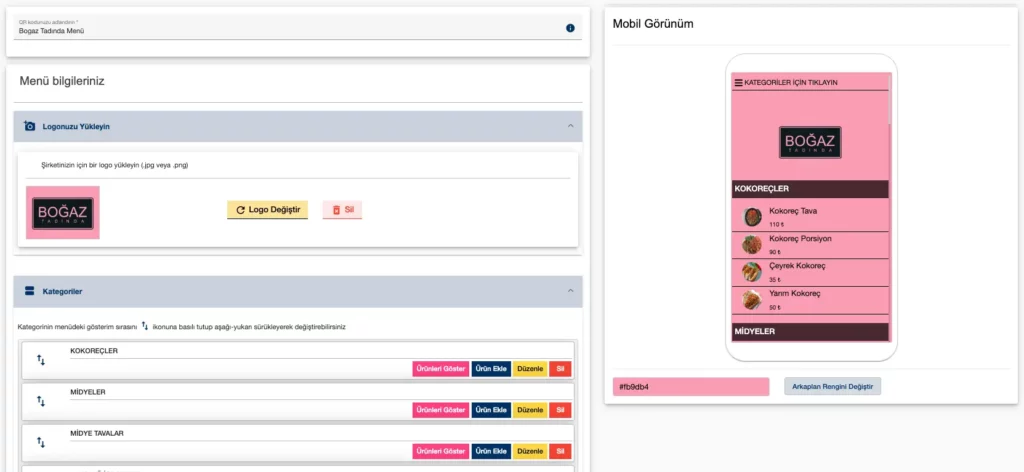
Create Your Menu QR Code
Achieving high customer satisfaction with Menu QR Codes is easy. Create your QR code now or contact us for detailed information.
Qrcodeg Menu QR Code Features
- Design Aligned with Business Identity
Thanks to the ability to add logos and background colors, you can create designs suited to your business identity. When the QR code is scanned, the menu opens with colors matching your business, contributing to your corporate identity. - Product Categorization
Thanks to products being listed under categories, customers can access products more easily. - Product Enable/Disable
For seasonal products or when certain dishes are unavailable, items can be instantly disabled. Changes update within seconds. This prevents customers from seeing sold-out items or those unavailable due to ingredient shortages. - Real-Time Updates
Dish ingredients and prices can be updated instantly. Customers scanning the QR code access the current menu. This enables accurate pricing and allows for happy hour or instant discounts. - In-Menu Search
Thanks to the search feature within menu content, restaurant customers can easily access the products they’re looking for. This is a sales-boosting factor, especially for fine dining restaurants, bars, and businesses with extensive menus. Search can be by product name or both product name and ingredients. For example, when searching for “shrimp,” both shrimp dishes and dishes containing shrimp (but not named after shrimp) will be listed. - Affordable Pricing
Being developed by a local company, Qrcodeg.com Menus are offered at much more affordable prices compared to competitors. - Trial Option
Like all QR codes created through Qrcodeg.com, Menu QR codes can be used free for 14 days after creation. You can continue using the same QR code by making payment within or after the 14-day period. - User-Friendly Interface
Creating menus and making updates is very easy with the user-friendly interface. No training or software knowledge required.
What Can Menu QR Codes Be Used For?
Menu QR Codes
Can be used in various businesses to improve customer experience and simplify ordering processes. Here are some places where menu QR codes can be effectively used:
Restaurants and Cafes
Being updatable and hygienic, and presenting products with images contributes to easy ordering and sales growth. Easy and fast price changes, product enable/disable features increase customer satisfaction.
Bars and Pubs
Preferred for providing easy ordering, not taking up space, and enabling quick access. Updatable prices suitable for instant campaigns and happy hour systems.
Hotels
Can be used in hotel restaurants, rooms, lobbies, and room service. Prices can be set per restaurant. When used together with Multi-Link QR Code, access to all hotel menus can be provided from a single location with one QR code.
Canteens and Cafeterias
Can be preferred in businesses providing quick food service to gain speed. Categorized and visual structure provides easy access to the entire menu.
Service Businesses
Can be used in businesses with fixed price lists like hair salons, tailors, and dry cleaners. A QR code placed in a visible location in the business can both increase customer satisfaction and improve staff efficiency.
Frequently Asked Questions

Are menu QR codes paid?
Yes, they are charged annually per QR code.
Is there a scan limit?
There is no scan limit on menu QR codes.
Is renewal mandatory when my membership ends?
No, if you do not make a payment, your QR code becomes inactive.
Can I keep using the QR code I created in trial mode after making the payment?
Yes, you can continue using the same code after payment.
What is the 14-day trial mode?
It is a free service offered for creating and testing a QR code for trial purposes before purchasing.
Is there special pricing for bulk purchases?
Yes, you can request special pricing by contacting us through our contact details.
Can I temporarily remove a product from the menu?
| You can make the products you want inactive so they do not appear on the menu. Products set to inactive are not shown to the person scanning the QR code until you reactivate them. |
Will my QR code change when I change my products or other information?
No, it does not change.
How many copies can I print from the same QR code?
The usage right of the QR code you create belongs to you throughout your membership. You can print an unlimited number of copies.
Will my QR menu work on all devices?
Your QR menu works smoothly on mobile phones, tablets, and desktop devices. It is compatible with all modern browsers.
Can I use the same QR code on multiple tables?
The QR code you create can be printed an unlimited number of times and directs all tables to the same menu.
Can I upload a PDF menu?
To create a PDF menu, you need to create a PDF QR code. Click here to go to our PDF Menu page.
Can I integrate my menu QR code into NFC cards?
You can embed your QR code link into NFC-enabled cards, stickers, or tabletop smart signs.
Does my QR menu appear on Google?
QR menus are not listed in search engines. Only users who scan the QR code can access the menu.
Do you offer a design service for QR code menus?
If requested, we also offer design services such as QR code posters, tabletop stands, or digital visuals.