


PDF QR Code Generator
PDF QR codes let you share files quickly and securely. With a single scan, users access the PDF directly and can download it immediately. No more dealing with email attachments.
Perfect for brochures, user manuals, product information, PDF menus, and reports. Customers access your file in seconds. You manage access from a single link. As a result, PDF QR codes simplify sharing and increase engagement.

What is a PDF QR Code?
With digital transformation, PDF QR codes have become a practical standard in business. Now you can share product catalogs or educational materials in seconds. Users scan the code, immediately open the file, and download it if needed. This saves both time and money compared to traditional methods.
Moreover, this approach is environmentally friendly. Since access is provided via code, unnecessary printing decreases and paper waste is prevented. As a result, sustainability and efficiency increase simultaneously.
PDF QR codes offer a flexible sharing channel for individual and corporate use. For example, reports, e-books, catalogs, and educational content become accessible with a single scan. Furthermore, you manage access from a single link and keep content flow organized.
With our PDF QR code service, sharing proceeds quickly and smoothly. Users instantly access the information they need, and barriers naturally decrease. In short, this method simplifies information sharing and visibly increases digital engagement.
What Are the Advantages of PDF QR Codes?
Accessible and User-Friendly:
Users open their camera, scan the code, and instantly access the PDF. No additional app download required. Even people not very familiar with technology can easily view the content.
Editable Content (Dynamic QR):
When you need to change the file, you update the content online, but the QR code remains the same. As a result, you always stay current with a single code.
Extended Content:
Go beyond classic distribution: add additional explanations, attachments, or redirects. This way, users access richer information with a single scan.
Compact Size:
Data stays in the cloud; the QR image remains small. Therefore, you can easily place codes generated on qrcodeg.com in brochures and other materials.
Cost and Time Savings:
With a single QR code, content stays constantly updated. This eliminates the need for reprinting and saves both budget and time.
Why Should I Create a PDF QR Code?
Share with a Single Code:
Share files like price lists, menus, catalogs, and presentations through a single QR code. This way, everyone accesses the same, current resource.
Embrace Efficiency:
PDF QR codes simplify information transfer. Detailed documents open with a single scan, and you don’t need large print materials. Perfect for presentations and manuals.
Dynamic and Flexible:
You easily update the PDF without changing the QR code. For example, when menus, schedules, and price lists are frequently revised, your customers always see the most current version.
Enhanced User Experience:
Users scan the code with their phone; files open directly in the browser. No additional app needed, and even complex content displays smoothly.
Eco-Friendly and Sustainable:
You reduce paper consumption with digital documents. Consequently, waste decreases, trees are protected, and you comply with modern environmental policies.
Track Engagement:
Monitor how many times your QR code has been scanned in real-time. This way, you measure content interest and improve your communication strategy with data.
Wide Compatibility:
PDF works smoothly on almost all devices and operating systems. As a result, you reach a broad audience regardless of technology preference.
Enhanced Security:
With dynamic QR, you manage access. Add password protection or restrict permissions if needed; sensitive information stays confidential.
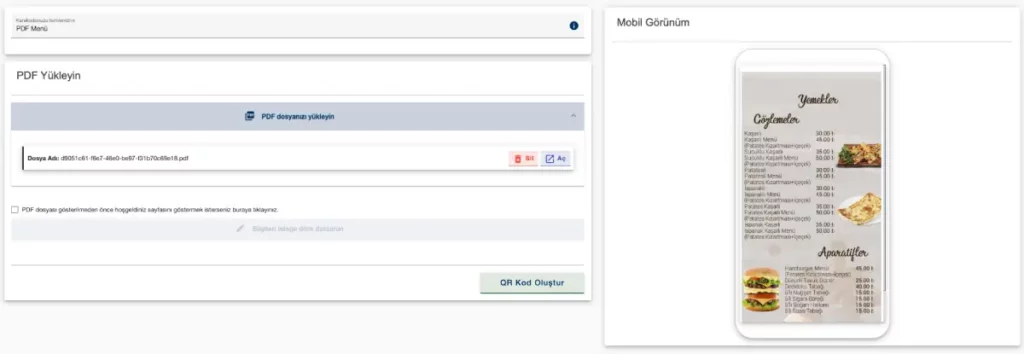
Create PDF QR Code
Creating an editable dynamic PDF QR code is easy. Upload your PDF, generate the QR code, and share immediately. Stay current with a single code for menus, catalogs, brochures, notices, or price lists. Create your QR code now or contact us for detailed information.
How Can I Create a PDF QR Code?
- First, create an account at qrcodeg.com, complete activation, and log in.
- Then click the “Create QR Code” button in the management panel and select “Dynamic PDF QR Code” from the screen that opens.
- Upload PDF: Drag and drop the file or upload via “Choose File.”
- Optional: To show a welcome page to users before the PDF, check the box and fill in the fields.
- Generate code: Click the “Create QR Code” button.
- Finally, download the QR code in PNG or SVG format and share.
- Result: With this workflow, you create the QR code once and update content instantly whenever needed.
What Can PDF QR Codes Be Used For?
PDF QR codes are an innovative way to share documents seamlessly in today’s fast-paced digital world. Anyone scanning the code with a smartphone camera instantly accesses various PDF documents. As a result, PDF QR codes are a powerful tool for situations that can revolutionize information sharing and our access methods.
Restaurants and Service Businesses
All businesses, including restaurants, can share price lists with customers. Present product images, ingredients, and all details together.
Hotels and Accommodation Facilities
On-site restaurants and bars can present services and products as PDFs. Additionally, share TV channels, informational materials, and tourist tour details by scanning a single QR code.
Educational Materials
Teachers add QR codes to class notes so students can access additional course materials, assignments, and educational videos.
Business and Marketing
Companies add PDF QR codes to business cards, brochures, or posters. This presents detailed product catalogs, user manuals, and promotional materials.
Event Management
For events, conferences, and workshops, organizers use QR codes. Participants instantly access event programs, digital brochures, and interactive maps.
Healthcare Information
Hospitals and clinics use QR codes for patient education, providing access to health guides, treatment plans, and privacy policies.
Real Estate
Real estate agents and construction companies add QR codes to signs or brochures. Potential buyers instantly access property details, virtual tours, and legal documents.
Travel and Tourism
Travel agencies and tourist facilities use QR codes to quickly present travel guides, local attraction details, and safety information.
Personal Use
Use PDF QR codes to share documents like digital invitations, resumes, portfolios, certificates, and achievement documents.
Embrace the convenience and versatility of PDF QR codes to enhance your communication, marketing, and information-sharing strategies. Open the door to what’s possible with a single scan.
Frequently Asked Questions
——–
What is a PDF QR Code?
With digital transformation, PDF QR codes have become a practical standard in business. Now you can share product catalogs or educational materials in seconds. Users scan the code, immediately open the file, and download it if needed. This saves both time and money compared to traditional methods.
Moreover, this approach is environmentally friendly. Since access is provided via code, unnecessary printing decreases and paper waste is prevented. As a result, sustainability and efficiency increase simultaneously.
PDF QR codes offer a flexible sharing channel for individual and corporate use. For example, reports, e-books, catalogs, and educational content become accessible with a single scan. Furthermore, you manage access from a single link and keep content flow organized.
With our PDF QR code service, sharing proceeds quickly and smoothly. Users instantly access the information they need, and barriers naturally decrease. In short, this method simplifies information sharing and visibly increases digital engagement.
What Are the Advantages of PDF QR Codes?
Accessible and User-Friendly:
Users open their camera, scan the code, and instantly access the PDF. No additional app download required. Even people not very familiar with technology can easily view the content.
Editable Content (Dynamic QR):
When you need to change the file, you update the content online, but the QR code remains the same. As a result, you always stay current with a single code.
Extended Content:
Go beyond classic distribution: add additional explanations, attachments, or redirects. This way, users access richer information with a single scan.
Compact Size:
Data stays in the cloud; the QR image remains small. Therefore, you can easily place codes generated on qrcodeg.com in brochures and other materials.
Cost and Time Savings:
With a single QR code, content stays constantly updated. This eliminates the need for reprinting and saves both budget and time.
Why Should I Create a PDF QR Code?
Share with a Single Code:
Share files like price lists, menus, catalogs, and presentations through a single QR code. This way, everyone accesses the same, current resource.
Embrace Efficiency:
PDF QR codes simplify information transfer. Detailed documents open with a single scan, and you don’t need large print materials. Perfect for presentations and manuals.
Dynamic and Flexible:
You easily update the PDF without changing the QR code. For example, when menus, schedules, and price lists are frequently revised, your customers always see the most current version.
Enhanced User Experience:
Users scan the code with their phone; files open directly in the browser. No additional app needed, and even complex content displays smoothly.
Eco-Friendly and Sustainable:
You reduce paper consumption with digital documents. Consequently, waste decreases, trees are protected, and you comply with modern environmental policies.
Track Engagement:
Monitor how many times your QR code has been scanned in real-time. This way, you measure content interest and improve your communication strategy with data.
Wide Compatibility:
PDF works smoothly on almost all devices and operating systems. As a result, you reach a broad audience regardless of technology preference.
Enhanced Security:
With dynamic QR, you manage access. Add password protection or restrict permissions if needed; sensitive information stays confidential.
Create PDF QR Code
Creating an editable dynamic PDF QR code is easy. Upload your PDF, generate the QR code, and share immediately. Stay current with a single code for menus, catalogs, brochures, notices, or price lists. Create your QR code now or contact us for detailed information.
How Can I Create a PDF QR Code?
- First, create an account at qrcodeg.com, complete activation, and log in.
- Then click the “Create QR Code” button in the management panel and select “Dynamic PDF QR Code” from the screen that opens.
- Upload PDF: Drag and drop the file or upload via “Choose File.”
- Optional: To show a welcome page to users before the PDF, check the box and fill in the fields.
- Generate code: Click the “Create QR Code” button.
- Finally, download the QR code in PNG or SVG format and share.
- Result: With this workflow, you create the QR code once and update content instantly whenever needed.
What Can PDF QR Codes Be Used For?
PDF QR codes are an innovative way to share documents seamlessly in today’s fast-paced digital world. Anyone scanning the code with a smartphone camera instantly accesses various PDF documents. As a result, PDF QR codes are a powerful tool for situations that can revolutionize information sharing and our access methods.
Restaurants and Service Businesses
All businesses, including restaurants, can share price lists with customers. Present product images, ingredients, and all details together.
Hotels and Accommodation Facilities
On-site restaurants and bars can present services and products as PDFs. Additionally, share TV channels, informational materials, and tourist tour details by scanning a single QR code.
Educational Materials
Teachers add QR codes to class notes so students can access additional course materials, assignments, and educational videos.
Business and Marketing
Companies add PDF QR codes to business cards, brochures, or posters. This presents detailed product catalogs, user manuals, and promotional materials.
Event Management
For events, conferences, and workshops, organizers use QR codes. Participants instantly access event programs, digital brochures, and interactive maps.
Healthcare Information
Hospitals and clinics use QR codes for patient education, providing access to health guides, treatment plans, and privacy policies.
Real Estate
Real estate agents and construction companies add QR codes to signs or brochures. Potential buyers instantly access property details, virtual tours, and legal documents.
Travel and Tourism
Travel agencies and tourist facilities use QR codes to quickly present travel guides, local attraction details, and safety information.
Personal Use
Use PDF QR codes to share documents like digital invitations, resumes, portfolios, certificates, and achievement documents.
Embrace the convenience and versatility of PDF QR codes to enhance your communication, marketing, and information-sharing strategies. Open the door to what’s possible with a single scan.
Frequently Asked Questions

Can I use the PDF QR code as a restaurant menu?
Yes, you can. However, the annual usage fee for PDFs used as menus is different from regular PDF QR codes.
Why is there a file size limit for PDF files?
PDF files that exceed a certain size take longer to open depending on the internet speed and device of the person scanning. Files that open late or never open negatively affect your brand image. For this reason, we apply an upper size limit. However, you can easily reduce the file size with PDF optimization techniques.
Is renewal mandatory when my membership ends?
No, but if you do not make a payment at the end of the term, your QR code becomes inactive.
What is the 14-day trial mode?
It is a free service offered for creating and testing a QR code for trial purposes before purchasing.
Can I keep using the QR code I created in trial mode after making the payment?
Yes, you can continue using the same code after payment.
Is there special pricing for bulk purchases?
Yes, you can request special pricing by contacting us through our contact details.
Can a company logo or photo be added to the PDF QR code?
It can be added if you use a company logo or a logo landing page.
Will my QR code change when I change my PDF file?
Your QR code does not change, it stays the same.
Are PDF QR codes paid?
PDF QR codes are charged annually per QR code. Purchases can be made for up to 10 years.
Is there a scan limit?
There is no scan limit on PDF QR codes.