


Social Media QR Code
Social media QR codes let users consolidate all their digital profiles into a single link. Share easily and effectively with followers, customers, and contacts.
Combine links from Instagram, YouTube, WhatsApp, websites, and other platforms into one QR code. Update your links anytime without reprinting.
What is a Social Media & Multi-Link QR Code?
All Social Media in One QR Code
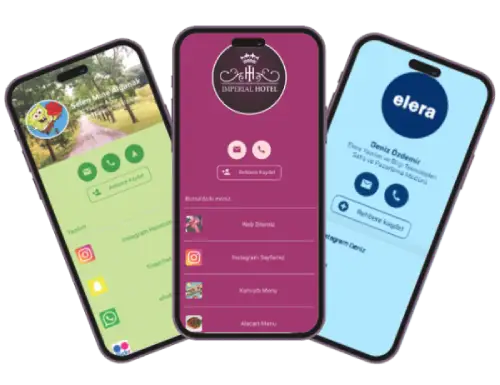
Also known as a Linktree alternative, this QR code type lets you share links from Instagram, YouTube, Facebook, LinkedIn, and other social media platforms. Additionally, you can include marketplace sites like eBay, Amazon, Etsy, or classified ad platforms. Both individuals and businesses can use this versatile solution.
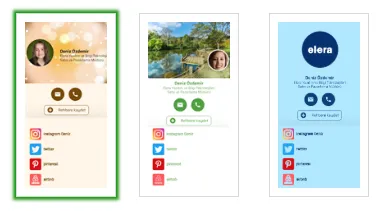
This QR code type offers three different design options. Customize with background colors or images, personal photos, or logos. Social Media QR codes can be used standalone or integrated into NFC-enabled contactless digital business cards.
Anyone actively using social media and online platforms for sales or services can benefit from social media and multi-link QR codes. Even socially active individuals can use them to share all their social media accounts with their network in one simple scan.
Who Can Use Social Media and Multi Link QR Codes?

E-Commerce & Marketplace Sellers
Sellers operating on corporate websites and marketplace platforms can consolidate all their store profile links, websites, and social media profiles under a Social Media and Multi-Link QR code. Print it on promotional products and business cards to provide customers with a more professional service and brand image.

Real Estate Agents & Property Professionals
Real estate agents, property companies, and construction firms selling through corporate websites and listing sites can consolidate their profile links under a Social Media and Multi-Link QR code. Print it on business cards, online ads, or brochures to help customers easily access your property portfolio. Create your real estate landing page with QR code now.

Car Dealerships & Auto Dealers
Car dealers and automotive retailers selling vehicles can consolidate their classified ad site profiles and social media links under a Social Media and Multi-Link QR code. Share all profiles with a single link to enhance your corporate image and easily share contact information.
Restaurants, Cafes & Service Industry
Restaurants, cafes, or businesses with multiple menus or price lists can consolidate all their menus, websites, and social media accounts under Menu QR Code or PDF Menu QR Code. Present all your services to customers in one scan. Creating menus, adding products, removing items, and changing prices is easy.

Hotels & Accommodation Facilities
Hotels and accommodation providers can consolidate links to their services, digital restaurant menus, TV channel information, tours, sauna details, informational materials, pool, massage, and other on-site and off-site services under a Social Media and Multi-Link QR Code. Inform customers to reduce workload and increase sales.

Sports Clubs & Associations
Associations, sports clubs, event organizers, and municipalities active on social media can consolidate all their social media links and event links under a single QR code. Inform followers quickly and easily with this Linktree alternative.

Socially Active Individuals
People with a wide social circle can consolidate their active social media accounts under a single link. Share all your social media accounts at once with new contacts.

Influencers & Content Creators
Influencers and social media personalities can use this as a platform to share links to their broadcasting channels, websites, or collaboration videos. Share a single QR code to deliver all your links to followers.

Showrooms & Retail Stores
Companies selling or showcasing products in large spaces can create Product QR Codes for their items. Customers or visitors can easily get detailed product information and pricing. Instant price updates prevent incorrect pricing. Sales staff time is used more efficiently.
How to Create a Social Media & Multi-Link Landing Page
- To create your QR code landing page, first sign up and log into the system.
- The page that opens will list your created QR codes. From the left menu or the green Create QR Code button at the top of the page, access the page where you’ll create your landing page by clicking Social Media and Multi-Link.

- Start by naming your Social Media and Multi-Link QR code landing page. Then choose from 3 different design options below.
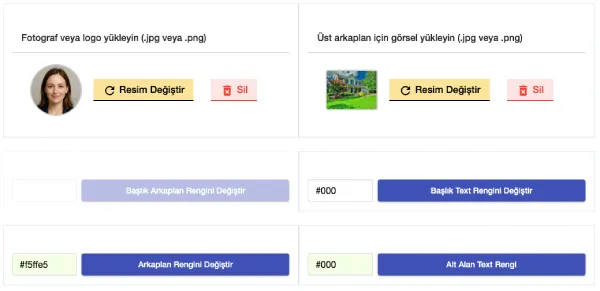
- Next, select a logo or photo for the top of your landing page and choose a background image. You can also select background color and text color for the lower part of your page.
- In the next step, if you want contact information and a navigation link visible, simply right-click on your business location at http://maps.google.com to copy the latitude and longitude coordinates, then paste them into the appropriate field.
- The last thing to do before creating your landing page is to add your social media links, website, and classified ad site links. Add all your links as shown below: enter the link name (e.g., Our Instagram Profile) in the Name Your Link field, and paste your profile link or website address in the Link field.
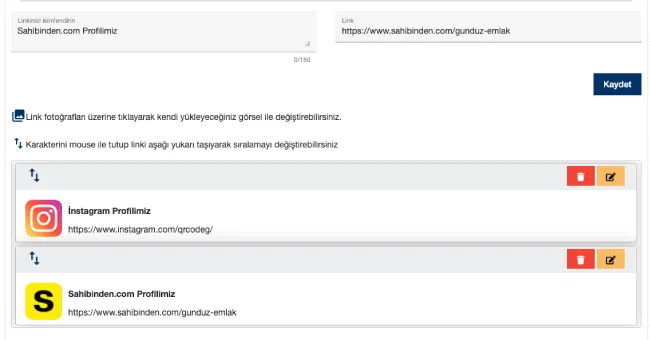
- Logos for popular social media sites, marketplaces, and classified ad sites will appear automatically. For your own website or sites without automatic logos, click the right arrow button to upload your own logo or the relevant website’s logo.
- Even if you didn’t add links in order, you can later rearrange them thanks to Qrcodeg.com’s flexible infrastructure. Simply click and hold the up/down arrow icon on each link to drag it to your desired position.
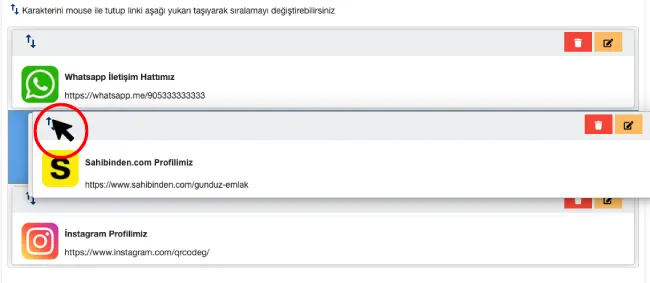
- You can add not just website links but also WhatsApp links. For this, give your link a name in the “Name Your Link” field like Our WhatsApp Contact Line, then in the link field, enter your number in this format: https://whatsapp.me/1253333333. Note: Start with the country code (90 for Turkey) followed by your phone number—don’t use + (plus) or 00 (double zero) as these won’t work correctly.
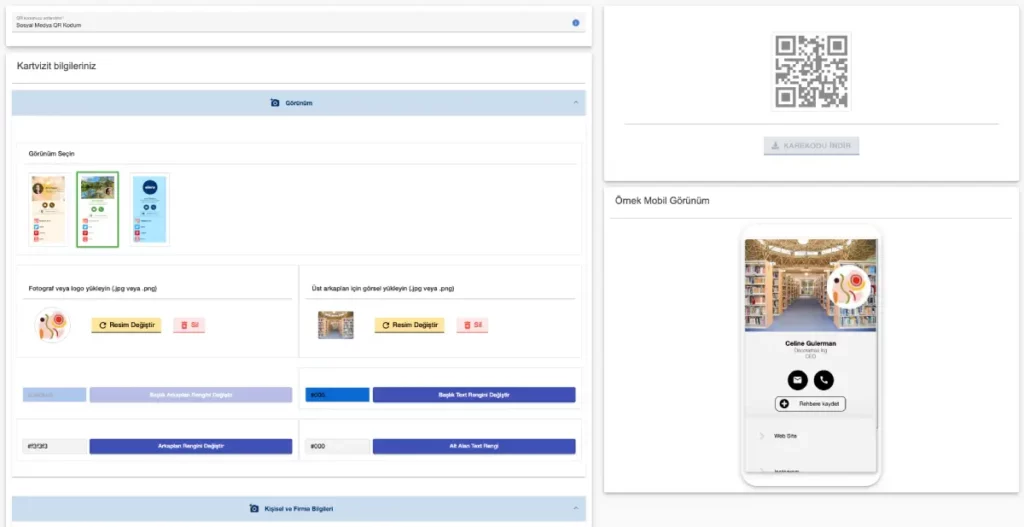
Create Your Social Media and Multi Link QR Code
Creating an editable dynamic QR code for your business card is easy. Create your QR code now or contact us for detailed information.
What Are the Advantages of Social Media QR Codes?
- Editable QR Code: Similar to business card QR codes, all contact information and links that generate the QR code can be updated online by the user. Even if all information in the QR code changes, the QR code itself remains the same.
- Customizable Interface: Offering 3 different design options, this service allows you to reflect your profile accurately according to your purpose. It contributes to your image and strengthens your corporate and personal identity. Each design provides an aesthetic and professional appearance, increasing your brand value.
- Easy Management: Thanks to Qrcodeg.com’s user-friendly interface, manage your QR code anytime, anywhere with easy creation and update features.
- Affordable Cost: 100% locally developed software offers reasonable pricing for purchase and renewal.
- Unlimited updates and scans: Throughout your membership, you can change all the information that makes up your QR code as many times as you want. There are no printing limits or scan limits for QR codes.