


'/%3E%3Cpath%20fill='%23b2b2b2'%20d='M241%20382q0%2016%2017%2026%2017%2011%2042%2011t42-11q16-11%2017-26V269H241'/%3E%3Cpath%20fill='%239f7e00'%20d='M241%20379q0%2014%208%2023%209%209%2021%209%2014%200%2021-9%209-9%209-23V269h-59'/%3E%3Cpath%20d='M241%20339v-70h59v110q0%2014-9%2023l-6%205v-68h-15v72q-8%200-14-4v-68zm59%2040c0%2022%2015%2032%2029%2032%2021%200%2030-18%2030-32v-40h-59'/%3E%3Cpath%20fill='%239f7e00'%20d='M266%20277v5h2v12h-3v-5h2v-5h-9v5h2v5h-4v9h3v18h-5v10h34v-10h-5v-18h3v-9h-4v-5h2v-5h-9v5h2v5h-3v-12h2v-5zm42%20101q0%2010%206%2017%206%206%2015%207%2010-1%2016-7%206-7%206-17v-29h-43'/%3E%3Ccircle%20fill='%230044ad'%20cx='329.5'%20cy='372'%20r='6'/%3E%3Cellipse%20fill='%230044ad'%20cx='300'%20cy='340'%20rx='16'%20ry='21'/%3E%3C/svg%3E)
✦ For registrations, surveys and feedback
Create a QR Code Form Online in Minutes
Design your form in the dashboard, then share the QR code or short link. Visitors fill it in without signing in, and every response lands in one panel.
- Ready-made templates and 12 field types
- No sign-up needed to fill it in
- See responses in your panel and export them as CSV
Create Your Form →How it works
Try it without an account · 14-day free trial
How It Works
Your form is live in three steps.
1
Design
Pick a template or start blank, add your fields and check them in the live preview. Start without an account and sign in when you save.
2
Share
The QR code (PNG/SVG) and short link are created automatically. Print it, show it on screen or share the link — the QR stays the same when you edit.
3
Collect
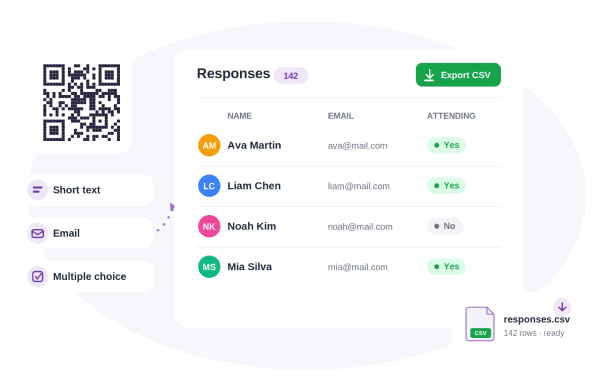
Responses land in a table in your panel and export to CSV in one click. The form closes itself at the closing date or response limit.
The New Form Builder
Five short steps: Template → Details → Fields → Design → QR name. Start without an account and sign in when you save.
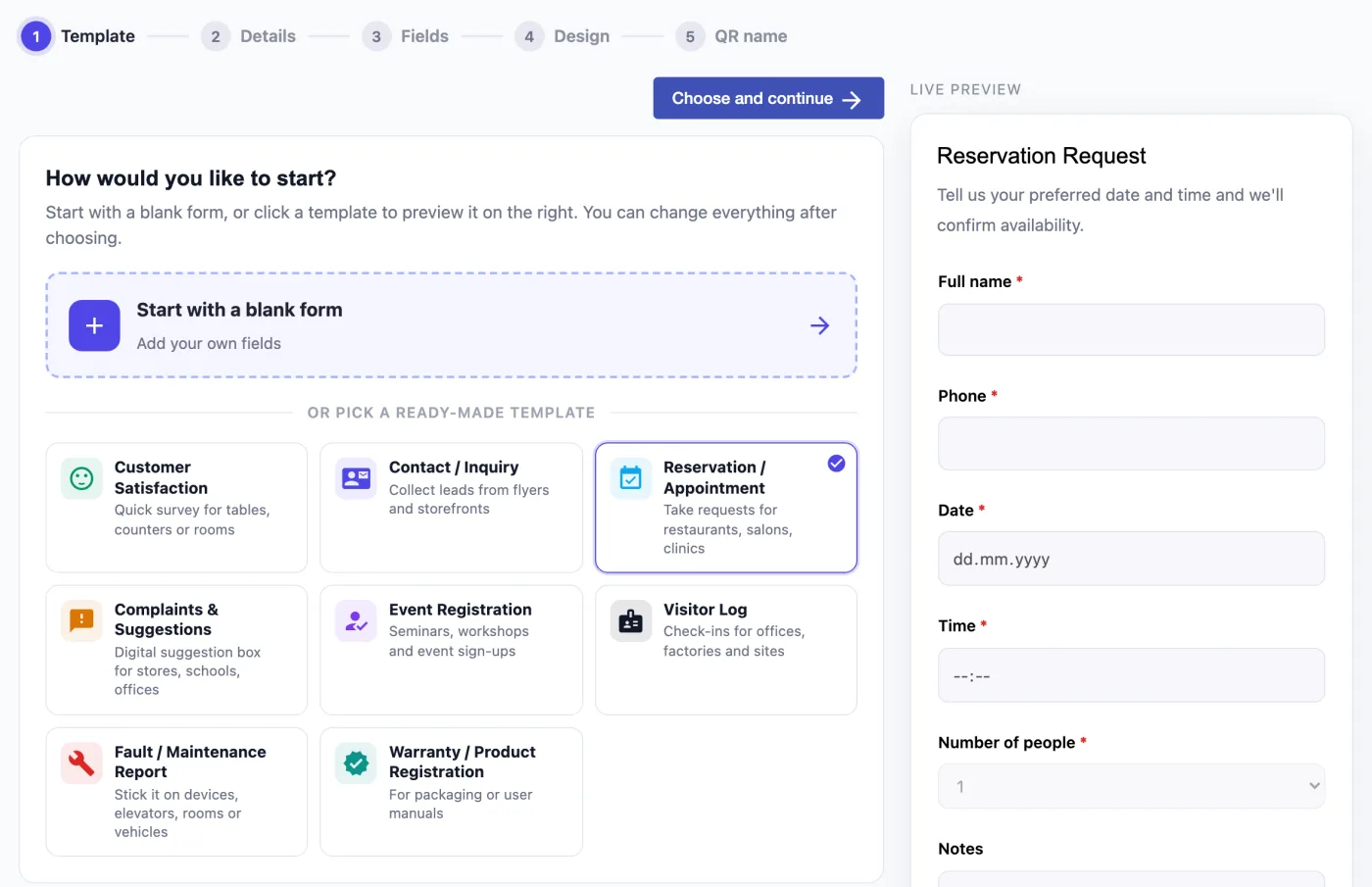
Start from a template
Click customer satisfaction, contact, reservation, complaints & suggestions, event registration, visitor log, fault report or warranty registration and instantly see how your form will look. Or start with a blank form.
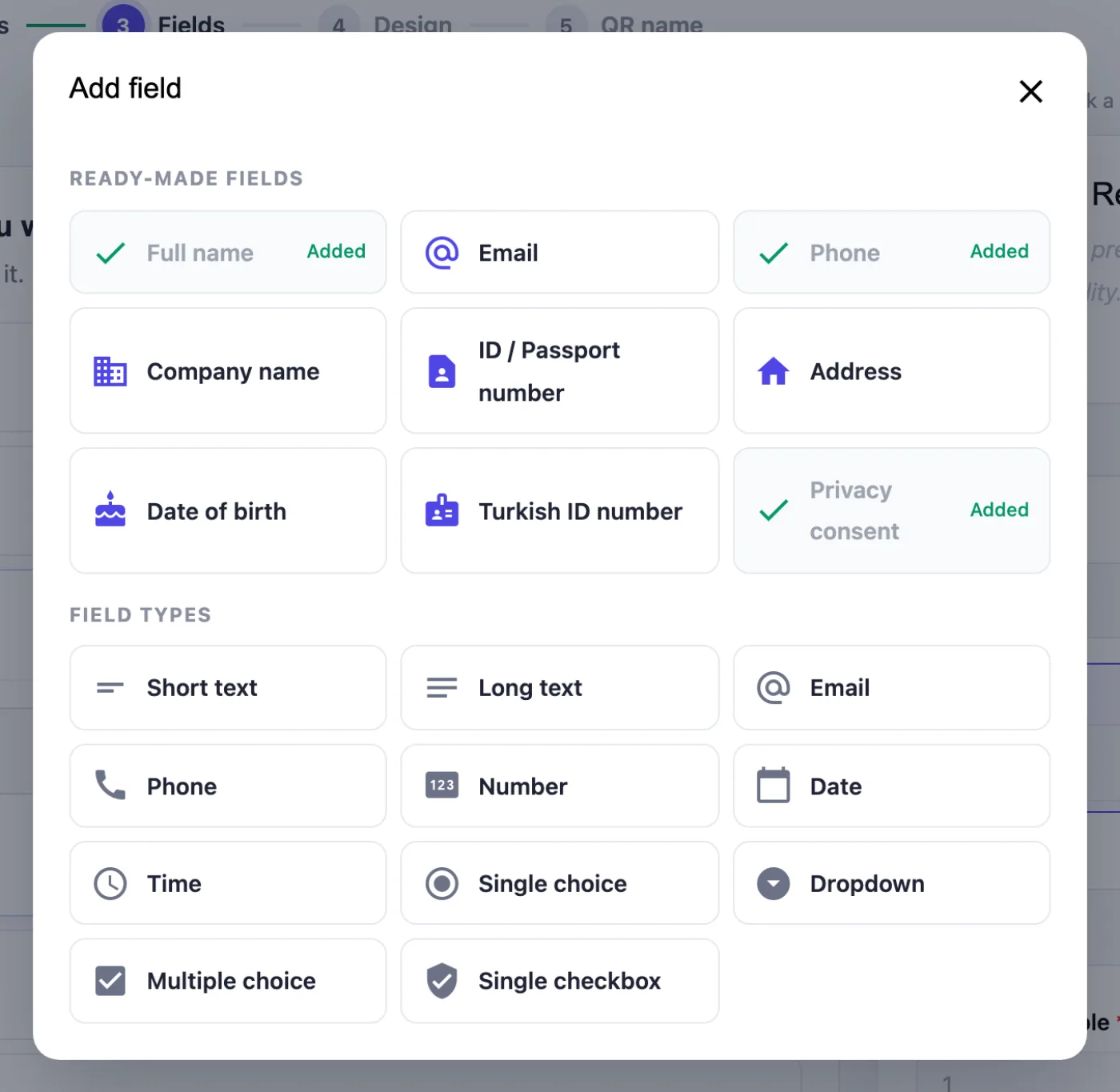
Add ready-made fields in one click
Full name, email, phone, company name, address, date of birth, ID / passport number and privacy consent come ready to use. Every field type — from short text to multiple choice — is in the same window.
Easy on your phone
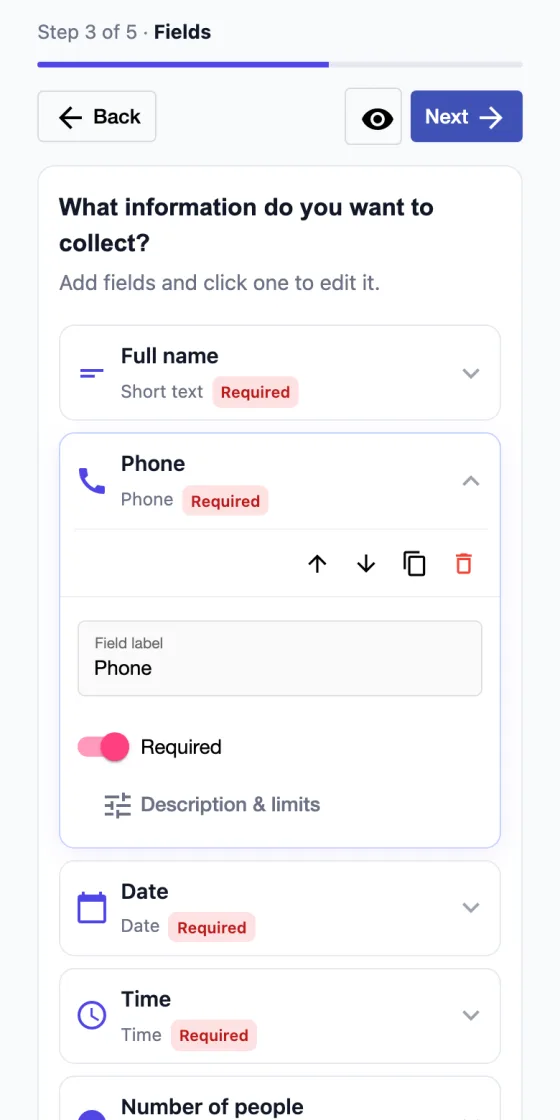
The wizard works smoothly on mobile: fields are listed as compact rows that open with a tap, and the preview opens full screen in one tap.
QR Code Form Features
12 Field Types + Ready-Made Fields
Text, email, phone, date, choice lists, checkbox and Turkish ID number. Ready-made fields like full name, company and address are one click away.
No Sign-Up to Fill In
Visitors scan the QR code and fill in the form right away — no account, no app and no URL to type.
Automatic Closing
Set a closing date or a response limit; the form closes by itself as soon as either one is reached.
CSV Export
Download every response as CSV in one click and analyse it easily in Excel or Google Sheets.
Cover Image & Logo
Match your brand with a cover image, your logo and a button color of your choice.
Multilingual Interface
The form interface is available in English, Turkish, Spanish and French and follows the visitor’s browser language.
Spam Protection
IP-based rate limiting and an invisible bot trap stop fake submissions; IP addresses are stored only as hashes.
Live Preview
See every change exactly as your visitors will, and check everything before you publish.
Fixed QR, Fresh Content
Your QR code stays live for a year; change the content as often as you like without reprinting.
Use Cases
Dozens of scenarios from a single QR code.
Event Registration & RSVP
Register attendees quickly with a QR code.
Wedding / Engagement RSVP
Collect attendance details from guests.
Survey & Feedback
Gather customer opinions via QR code.
Customer Satisfaction
A short post-service satisfaction form.
Contact / Request Form
Make it easy for visitors to reach you.
Dealer / Lead Collection
Build up a list of potential customers.
Job Application
Collect candidate details in a single form.
Reservation Pre-Request
Take table, room or appointment pre-requests.
Contest Entry
Collect giveaway and contest entries.
Order Request via QR at the Table
An order-request form next to your menu.
Guestbook
Take notes and contact info from visitors.
Fault & Maintenance Reports
Let people report a problem with a device or space instantly.
Security & Privacy
Designed to make anonymous access easy — with security as the default.
- Visitors don’t sign in — anonymous access, just like a digital invitation.
- Access uses an opaque short hash; sequential IDs never appear in the URL, so it’s closed to guessing and enumeration.
- IP-based rate limiting and a honeypot protect public submission endpoints from spam.
- Raw IPs are never stored — they are processed as hashes.
- A form that is inactive, expired or full is rejected on the server, not just hidden in the UI.
- The public form interface supports English, Turkish, Spanish and French.
Special Category Personal Data
Under Article 9 of the EU GDPR — and similar laws such as the UK GDPR, Brazil’s LGPD and Türkiye’s KVKK — data about health, religion, political opinions and similar topics is “special category” data whose processing is tightly restricted; criminal convictions are protected separately under Article 10. That’s why the following data cannot be collected with QR code forms:
- Health & blood type
- Religious or philosophical beliefs
- Political opinions
- Racial or ethnic origin
- Sex life & sexual orientation
- Criminal convictions
- Biometric & genetic data
- Trade union membership
Automatic detection
The builder scans field labels and options, flags any field asking for special category data and won’t let the form be saved.
Declaration before saving
Every time you save, you confirm as the data controller that you won’t collect such data; the confirmation is stored with a timestamp.
Server-side check
The check also runs on our servers, so forms that break the rules are never saved — not even through the API.
The person who creates a form is the data controller and is responsible for informing respondents and obtaining any consent required by law.
Pricing
Choose Form QR packages as 1, 2 or 3-packs. With your package, the QR code stays live for 1 year (365 days); the validity is fixed at purchase and starts counting down immediately. During that time you can change the form content again and again and reuse the same QR code.
Frequently Asked Questions
Do visitors need an account to fill in the form?
No. Visitors fill in the form anonymously, without signing in.
Do I need an account to create a form?
No. You can design your form without an account; your work is kept in your browser. When you click Save, you sign in or quickly sign up and pick up where you left off.
Are there ready-made form templates?
Yes. There are templates for customer satisfaction, contact, reservations, complaints & suggestions, event registration, visitor logs, fault reports and warranty registration. After choosing one you can change every field.
Can I edit the form after publishing it?
Yes. You can update the form content any time; the QR code stays the same, so there’s no need to reprint it.
How do I download the responses?
Use the per-form table view and CSV export in your panel to download every response in one click.
How many responses can I collect?
Unlimited — or you can set a maximum response limit if you prefer.
How long does the form stay open?
You can set a closing date or leave it open indefinitely. The form closes automatically once the date or the response limit is reached.
What happens when the QR code expires after I’ve printed it?
The QR code stays live for 1 year (365 days). When it expires, you can renew the package and reactivate the same QR code.
Can I collect special category data (health, religion, etc.) with a form?
No. Special category personal data under GDPR Article 9 and similar laws — health and blood type, religious beliefs, political opinions, ethnic origin, sex life, biometric and genetic data, trade union membership — as well as criminal convictions cannot be collected with QR code forms. The builder detects such fields and blocks saving, and each time you save you confirm that you won’t collect this data.
Which languages does it support?
The form interface supports English, Turkish, Spanish and French. You can write the form content in any language you like.
Build Your Form in Minutes
Design it, share the QR code, collect responses. Get started free.