


QR Code Generator
Create free static QR codes or feature-rich dynamic QR codes for your business. Edit content anytime, track scans, customize colors, and download in vector SVG quality.

What Is a QR Code Generator Service and What Does It Do?
QRCodeG.com is a SaaS-based web platform that lets businesses and individuals create both free static QR codes and feature-rich dynamic QR codes from a single interface. Static codes are free forever and ideal for one-time use, with instant color customization available right on our homepage. Dynamic codes can be edited anytime, track scan analytics, integrate with Apple Wallet, and download in vector SVG format suitable for print sizes as small as 1 cm.
How to Generate a QR Code
Follow these four steps to create your QR code.
- Identify the most suitable QR code type for your needs. Decide whether a static or dynamic QR code fits your use case better. Static codes are free and permanent. Dynamic codes are paid but editable, with scan analytics included.
- Visit our Dynamic QR Codes page to choose the right type. We offer specialized options for business cards, menus, PDFs, social media, products, and more.
- Navigate to the QR Code Generator page in your dashboard and select your QR code type. Define a name for easy identification, fill in the required fields, then click “Generate QR Code”.
- View your generated QR codes on the QR Code List page. Download in PNG for digital use or SVG (vector) format for high-quality printing at any size.
Note: Dynamic QR codes are paid. QR codes created during the trial period automatically become inactive after 14 days. You can keep them active by completing payment.
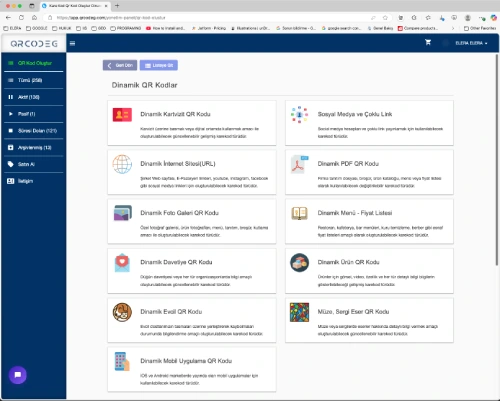
10 QR Code Types You Can Create
Pick the type that matches your purpose. Each type is purpose-built for a specific use case.
Business Card QR Code
Digital business cards with all your contact details. Scanners can save you to their phone in one tap.
Social Media QR Code
Linktree-style multi-link page combining all your social profiles, links, and content into one QR code.
URL QR Code
Link to any webpage. Change the destination URL anytime without reprinting the QR code.
PDF QR Code
Share catalogs, price lists, and brochures. Update the PDF anytime without changing the QR code.
Menu QR Code
Digital menus for restaurants and cafes. Update prices, photos, and items instantly.
Product QR Code
Product detail pages with images, descriptions, and purchase links. Ideal for packaging and stickers.
Photo QR Code
Share photo galleries through a single QR code. Perfect for events, weddings, and portfolios.
Event QR Code
Event invitations with date, location, and details. Attendees can save to calendar in one tap.
Mobile App QR Code
Direct downloads to App Store or Google Play. The QR code detects the device and serves the right link.
Pet Tag QR Code
Lost and found tags for pet collars. Anyone who finds your pet sees your contact details instantly.
What Do QR Codes Bring to Businesses?
Cost Advantage
With dynamic QR codes, brochures, posters, and menus don’t need to be reprinted every time content changes. Content is updated digitally, which significantly reduces printing costs and shortens the time between a change and its appearance in front of customers.
Easy and Direct Customer Access
QR codes let customers reach your website, product details, or campaigns within seconds. Codes placed at points of sale, in showrooms, or next to products on shelves give customers detailed information without needing to ask for help.
Reduced Labor Costs
In showrooms or stores, the need for staff is reduced when product details are provided via QR codes. One scan replaces what would otherwise require an in-person walkthrough.
An Impressive and Memorable Solution for Business Cards
vCard QR codes printed on business cards let recipients save your contact details with a single tap. Fast, modern, and leaves a lasting impression compared to handing over a card that may be discarded the same week.
Hygienic and Practical Menus for Restaurants
QR codes placed on tables let guests browse the menu without touching shared physical menus. Beyond hygiene, this also means menu items, prices, and seasonal specials can be updated within minutes from any device.
Easy Sharing of Price Lists
Wholesale businesses and service providers can deliver up-to-date price lists instantly via QR codes. PDFs shared this way are always current, and recipients always see the latest version without manual emailing.
Mobile-Friendly and Always Accessible
Pages accessed via QR codes are designed to open seamlessly on mobile devices. The user goes from camera to information in two seconds, with no app installation required.
Why Choose qrcodeg.com?
Features that set us apart from generic QR code generators.
QRCodeG offers customization options including 5 instant brand color choices and gated logo embedding for registered users. Choose from 10+ QR code types including vCard, URL, PDF, menu, social media, and event invitations. Download your QR codes in multiple output formats — PNG for digital use or SVG vector format for high-quality printing at any size, from 1cm stickers to billboards. Advanced design options including custom module shapes and full color picker are coming soon.
Apple Wallet Support
Add your business card or product QR code directly to Apple Wallet. Customers can save your card to their iPhone with one tap, then access it from the lock screen anytime.
Vector SVG Download
Download QR codes in SVG format for billboard-quality printing at any size. Scale up to large formats or down to 1 cm without losing sharpness or scan reliability.
Instant Edit, No Reprint
Change the destination of a dynamic QR code anytime, and the same printed code keeps working. Update menus, redirect campaigns, or fix typos without touching anything physical.
Detailed Scan Analytics
See total scans, scans per day, geographic distribution, and device breakdown (iOS, Android, desktop). Useful for measuring campaign performance, foot traffic, or printed material reach.
Customizable Design
Choose from 5 brand colors instantly on every QR code — black, blue, red, green, or purple — directly on our homepage with no signup required. Sign up free to add your logo to the center of your QR code. Built-in error correction keeps the code readable even with a logo overlay. Custom module shapes and full color picker rolling out soon.
Free Forever for Static Codes
Static QR codes for vCards, URLs, Wi-Fi, text, and more are free without registration. Use them indefinitely with no expiration, watermark, or hidden fees.
Wondering how QRCodeG compares to other QR code platforms? See our detailed pricing comparison with Uniqode, Flowcode, and other major services — including total cost over 1, 5, and 10-year terms.
Differences Between Dynamic and Static QR Codes
The QR codes you can create on QRCodeG.com fall into two main categories: Static QR Codes and Dynamic QR Codes. Each type has its own advantages and use cases.
| Feature | Static QR Code | Dynamic QR Code |
|---|---|---|
| Editable after creation | No | Yes — change destination anytime |
| Scan analytics | Not available | Total scans, location, device, time |
| QR code complexity | Higher (more dense) | Lower (cleaner, smaller) |
| Minimum readable print size | 3-4 cm | 1 cm |
| Pricing | Free forever | Paid subscription |
| Apple Wallet support | No | Yes |
| Color customization | 5 brand colors (instant) | 5 brand colors + logo (free account) |
| Best for | Wi-Fi passwords, simple links, one-time use | Business cards, menus, campaigns, products |
What Is a Dynamic QR Code?
A Dynamic QR Code embeds a fixed link (such as qrcodeg.com/abc123) inside the code, which redirects users to data on the server that can be updated.
- Content is editable after the QR code is created.
- Same QR code visual keeps working even when content changes.
- Scans are counted with detailed statistical data.
- Smaller and cleaner visual, easier to scan in any condition.
- Paid, but offers advanced features and flexibility.
- Use cases: Business cards, menus, product catalogs, campaigns, social media redirects.
What Is a Static QR Code?
A Static QR Code encodes the information (URL, text, vCard, etc.) directly into the QR code itself. Once created, it cannot be managed.
- Cannot be managed and content cannot be changed after creation.
- Free forever, no expiration or service shutdown risk.
- Data is written directly into the code, so the visual is more dense.
- Use cases: Simple links, Wi-Fi passwords, email addresses, vCards.
- Doesn’t support PDFs, images, menus, or any media-heavy content.
The Most Important Difference Between Dynamic and Static QR Codes
Below you can find both static and dynamic QR codes printed at the same size. On the left is a static QR code that can be created for free. On the right is the dynamic QR code version of the same link.

Static QR Code

Dynamic QR Code
Try scanning both QR codes. The one on the left likely won’t be readable. The one on the right, being a dynamic QR code, will scan easily.
One of the two most important features of dynamic QR codes is that they take up less space, preserving the aesthetic appearance of the printed material.
The second important feature is that the displayed information can be changed after creation, without altering the QR code itself.
Industries Using QR Codes
Real-world applications across sectors. Each example reflects what our customers actually use QR codes for.
Retail & E-Commerce
Product packaging QR codes link to detailed product pages, video reviews, or sizing guides. Showroom QR codes let customers explore product specs without waiting for sales staff. Receipts include QR codes for warranty registration and return policies.
Hospitality & Restaurants
Table-side QR codes show the current menu without printing. Hotel rooms include QR codes for room service, Wi-Fi credentials, and concierge requests. Bar coasters direct customers to drink lists or loyalty programs.
Events & Conferences
Badges include QR codes that share contact details between attendees instantly. Session boards have QR codes linking to speaker bios and slide decks. Exit surveys are collected through QR codes printed on the back of badges.
Healthcare & Clinics
Medication packaging includes QR codes linking to dosage instructions in multiple languages. Patient ID bracelets carry emergency contact information. Clinic waiting rooms display QR codes for appointment booking and feedback forms.
Real Estate
For-sale signs include QR codes linking to property listings, virtual tours, and floor plans. Open house brochures use QR codes for instant agent contact. Rental signs track which neighborhoods generate the most scan-based interest.
Marketing & Advertising
Print campaigns include QR codes that track scan count and location to measure ROI. Magazine ads link to landing pages with promo codes. Outdoor billboards use QR codes that adapt to time of day, redirecting to lunch deals at noon and dinner offers at evening.
What Is Vector QR Code Generation?
Vector QR codes are a technology that lets you scale your QR codes up or down with no loss of quality. With this approach, you get high-quality printing without needing applications like CorelDRAW or Illustrator.